


What is cloud computing?
Discover the essentials of cloud computing, including its benefits, types, and practical use cases. Read the article to enhance your tech knowledge!

Cloud computing has revolutionized how businesses operate, eliminating the need for expensive on-premises infrastructure while offering unmatched scalability and flexibility. Whether you're streaming a movie, collaborating on a shared document, or managing enterprise applications, the cloud powers these experiences by delivering computing resources over the internet.
This comprehensive guide breaks down the fundamentals, exploring various cloud services, cloud deployment models, benefits, security considerations, and the latest trends shaping the future of cloud technology.
What is cloud computing?
Cloud computing refers to the on-demand delivery of resources—such as servers, storage, databases, networking, software, and computing power—over the internet. Instead of purchasing and maintaining infrastructure, businesses can access these cloud services as needed through service providers, significantly reducing costs and improving scalability.
By leveraging the cloud, organizations can store data remotely, run applications from any device, and eliminate hardware maintenance. This approach transforms traditional IT infrastructure into a flexible, consumption-based service model that adapts to various business needs while freeing teams to focus on innovation rather than managing physical servers and underlying infrastructure.
Cloud computing services
Cloud computing services provide varying levels of control, management, and customization, enabling organizations to select the optimal cloud service model for their specific business needs. These services fall into three main categories:
- Infrastructure as a Service (IaaS): Provides virtualized resources including servers, storage, and networking without requiring businesses to maintain physical infrastructure. IaaS offers the greatest flexibility and management control over your IT resources. For CIOs in regulated industries, this control supports more granular oversight of data residency, access policies, security configurations, and compliance requirements. However, organizations retain responsibility for managing and securing operating systems, applications, data, and many infrastructure-level controls, making clear governance policies and accountability essential.
- Platform as a Service (PaaS): Offers a complete managed environment for developing, testing, and deploying applications without the complexity of building and maintaining the underlying infrastructure. PaaS accelerates development and reduces time-to-market. For CIOs, this model can simplify infrastructure governance by shifting responsibility for underlying platform maintenance to the provider. However, organizations must still evaluate application security, data protection, access controls, and whether the platform supports required compliance and audit capabilities.
- Software as a Service (SaaS): Delivers fully functional cloud computing software applications accessed via the internet without requiring local installation or maintenance. SaaS eliminates concerns about hosting and managing the application. For CIOs overseeing regulated environments, governance focuses on data privacy, user access, vendor compliance, retention policies, and integration with enterprise security standards. While the provider manages the application infrastructure, organizations remain accountable for appropriate data handling, access management, and regulatory compliance.
These service models represent the main types of cloud computing that enable businesses to scale cloud resources, reduce costs, and improve efficiency while focusing on innovation rather than managing complex IT environments. Organizations can choose one or combine multiple service types to create a cloud architecture that best supports their objectives.
How cloud service models affect IT operations and governance
Choosing between IaaS, PaaS, and SaaS affects more than infrastructure flexibility and cost. For IT operations leaders, each cloud service model determines how much control teams retain over security policies, configuration management, monitoring, and day-to-day operations. Understanding these differences helps organizations balance operational efficiency with governance and compliance requirements.
IaaS provides greater operational control but requires more hands-on management. IT teams typically manage operating systems, patching, network configurations, access policies, and workload security. This flexibility supports customized governance controls and consistent policy enforcement across complex environments, but it also increases the need for monitoring, automation, and internal operational expertise.
PaaS reduces infrastructure management while maintaining application-level oversight. Providers handle much of the underlying infrastructure and platform maintenance, allowing IT teams to focus on application deployment, identity management, data protection, and configuration policies. Operational complexity decreases, but teams must ensure that provider-supported controls align with internal governance standards and compliance requirements.
SaaS minimizes infrastructure management but shifts operational priorities toward vendor oversight and data governance. IT teams generally focus on user provisioning, access permissions, data retention, integration security, and monitoring compliance with organizational policies. Because configuration and enforcement capabilities vary by application, evaluating vendor transparency, audit reporting, and available security controls is essential.
For Directors of IT Operations managing hybrid or multicloud environments, the challenge is maintaining consistent governance across these different service models. Centralized visibility, standardized access policies, automated compliance monitoring, and clearly defined responsibilities can help reduce management complexity while ensuring that security and operational standards are applied consistently.
Cloud providers
Cloud providers manage extensive data centers, servers, and networking infrastructure, allowing businesses to focus on core operations instead of IT maintenance. These service providers manage underlying infrastructure, including applicable security updates and maintenance, while offering capabilities that help organizations meet their security and compliance requirements. Specific responsibilities vary by service model and provider. Leading cloud service providers include:
- Amazon Web Services (AWS): A widely used platform offering comprehensive resources, storage solutions, and advanced AI services with global reach and extensive scalable infrastructure.
- Microsoft Azure: Known for seamless enterprise integration, robust hybrid cloud capabilities, and sophisticated AI technologies that complement existing Microsoft operating systems and applications.
- Google Cloud Platform (GCP): Specializes in big data analytics, machine learning, and highly scalable applications with powerful computing power for data-intensive workloads.
Businesses can select a cloud provider based on specific security technologies, performance requirements, cost considerations, geographic availability, and compatibility with existing IT infrastructure. Many cloud providers offer specialized services that may align better with particular industry needs or technical requirements.
Cloud deployment models
Different types of cloud computing deployment models provide varying levels of control, security, and management:
Public cloud
A public cloud is a cloud environment owned and operated by third-party providers over the internet, giving multiple users access to shared computing resources without maintaining infrastructure.
Operating on a flexible pay-as-you-go model, they allow businesses to scale resources as needed while significantly reducing costs. Cloud providers handle all software updates and security, ensuring a reliable and up-to-date environment without additional overhead. This deployment model offers maximum scalability with minimal capital investment.
Private cloud
A private cloud is a cloud computing environment dedicated to a single organization, offering exclusive access to resources. Managed internally or by a cloud service provider, it ensures greater control over security, compliance, and performance.
With internal hosting and firewalls, private clouds provide enhanced data protection and customization options for sensitive data and critical applications, making them ideal for businesses with strict regulatory requirements or specialized IT infrastructure needs. This model delivers the benefits of cloud computing with additional security and control.
Hybrid cloud
A hybrid cloud model is a cloud computing environment that strategically combines public and private cloud features through a unified management platform. This model allows businesses to shift workloads between environments based on computing demands, security needs, and cost considerations.
By integrating both private and public clouds, organizations gain the scalability and cost efficiency of a public cloud while maintaining greater control and security for data in their private cloud infrastructure.
Explore hosted private cloud, multi-tenant cloud, and hybrid cloud to find the best fit for their infrastructure. Get the Guide!

Cloud computing benefits
Cloud computing provides scalability, flexibility, and cost savings, transforming capital expenses into operational costs while allowing businesses to focus on innovation instead of IT management. It significantly enhances business continuity and disaster recovery capabilities, reducing data loss and downtime. With on-demand resources and rapid deployment, cloud computing adapts to fluctuating workloads efficiently, enabling organizations to scale computing power up or down based on actual needs rather than projected capacity.
Cloud computing concerns
Cloud security
Cloud security encompasses comprehensive measures and best practices to safeguard data, applications, and infrastructure in cloud environments. These security technologies include robust data encryption and access controls to prevent unauthorized access and ensure data confidentiality.
Leading cloud providers offer regular security updates and patches, helping to reduce the risk of security breaches while minimizing vulnerability exposure. Additionally, cloud security supports compliance with industry regulations, including HIPAA and PCI-DSS, ensuring businesses meet strict data protection standards without managing complex security systems internally.
Cloud sustainability
Cloud sustainability focuses on reducing the environmental impact of cloud computing by minimizing energy consumption and carbon footprint across data centers and computing resources. Many cloud providers invest in renewable energy, energy-efficient hardware, and optimized cooling systems to create more sustainable infrastructure that meets growing environmental concerns.
By leveraging energy-efficient data centers and advanced resource optimization, cloud computing offers a significantly more eco-friendly alternative to traditional on-premises infrastructure. This approach helps businesses lower their environmental impact while maintaining high performance and scalability, often supporting corporate sustainability goals and reducing long-term costs associated with energy consumption.
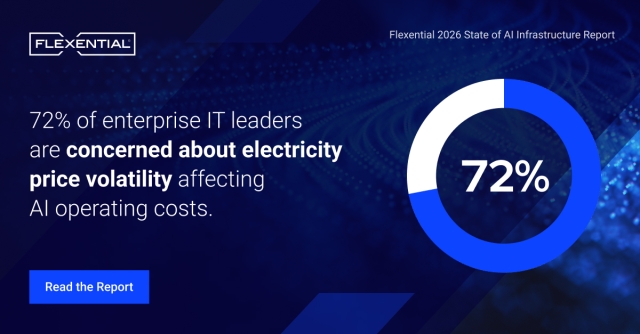
72% of enterprise IT leaders are concerned about electricity price volatility affecting AI operating costs. Read our State of AI Infrastructure report
Cloud computing trends
Cloud computing continues to grow as businesses increasingly adopt hybrid clouds, serverless computing, and cloud-native applications to enhance operational flexibility and cost efficiency while reducing reliance on traditional IT infrastructure. As AI adoption accelerates, organizations are also reevaluating how cloud infrastructure, networking performance, and workload placement support increasingly demanding applications.
Additionally, AI and machine learning technologies are being deeply integrated into cloud environments, enabling automated processes, advanced analytics, and smarter decision-making across industries. Multi-cloud strategies are also gaining momentum as organizations seek to optimize resources, avoid vendor lock-in, and leverage specialized services from various cloud providers, further driving cloud innovation and adoption.
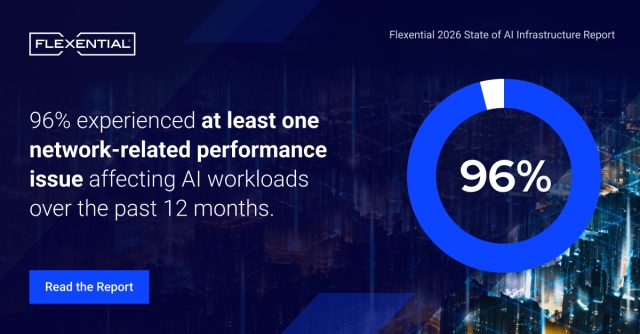
96% of enterprise IT leaders experienced network-related performance issues affecting AI workloads over the past 12 months, highlighting the importance of connectivity and infrastructure readiness as AI adoption expands. Read our State of AI Infrastructure report
Cloud computing use cases
Cloud computing supports a wide range of applications across industries, enabling businesses to scale operations efficiently while transforming how they manage IT infrastructure. Key use cases include:
- Data backup and disaster recovery – Ensures business continuity by safeguarding critical data and minimizing downtime during unexpected disruptions.
- Software development and testing – Provides on-demand resources for rapid application deployment, reducing time-to-market for new software applications.
- Customer-facing web applications – Powers e-commerce platforms, streaming services, and SaaS platforms that require scalable infrastructure and consistent performance.
- Big data analytics and IoT – Processes vast datasets from connected devices and supports real-time decision-making through powerful computing services.
- Cybersecurity – Enhances threat detection and data protection with AI-driven security solutions that adapt to evolving threats.
Cloud computing pricing
Cloud computing services offer flexible pricing models tailored to different business needs and computing demands. Common options include:
- Pay-as-you-go – Charges based on actual resource usage, ideal for businesses with fluctuating demands and those seeking to avoid large capital expenditures.
- Subscription-based – Fixed monthly or annual pricing for predictable cloud costs and long-term service commitments with consistent access to resources.
- Reserved instance pricing – Significant discounts for pre-purchasing resources over a set period, optimizing costs for stable, predictable workloads.
These cloud cost models provide greater cost control and transparency compared to traditional on-premises infrastructure, allowing businesses to scale expenses based on their specific operational needs while converting capital expenses into more manageable costs.
Regain control over your public cloud costs with Flexential FinOps, a comprehensive solution to maximize the business value of your public cloud investments. Learn more
Transform your business with Flexential cloud solutions
Flexential offers a comprehensive suite of cloud solutions engineered to address complex hybrid IT challenges and accelerate long-term business growth. By expertly implementing private, public, and hybrid cloud environments, Flexential provides flexible and scalable infrastructure precisely tailored to your organization's unique computing needs while eliminating the burden of managing physical servers.
With an unwavering focus on security, compliance, and performance, Flexential cloud services enable businesses to rapidly adapt to changing market demands while maintaining complete control over their IT resources and sensitive data. Whether you're looking to modernize your existing infrastructure or embark on a complete digital transformation, the team of experts at Flexential is ready to assist you every step of the way.
Learn more about Flexential cloud solutions